Archives August 2026

ShieldBreak bypasses Microsoft’s patch for earlier Defender flaw

Microsoft Defender’s latest patch bypass shows a familiar problem.

A newly disclosed Microsoft Defender flaw called ShieldBreak shows that fixing one attack path doesn’t always close every route to the same result.

Microsoft has assigned ShieldBreak the identifier CVE-2026-69414 and confirmed it is an elevation of privilege (EoP) vulnerability in the Microsoft Malware Protection Engine. Microsoft says it is still working on a security update.

If that sounds somehow familiar, you’re probably thinking of RoguePlanet, another vulnerability in Defender that Microsoft acknowledged on June 16 and patched on July 8.

A short timeline

At the time, the published exploit for RoguePlanet was described as depending on a race condition, meaning it was not guaranteed to work the same way on every machine. That was one reason the vulnerability was concerning but still somewhat limited from a practical point of view.

Microsoft’s July fix should have closed the door on that problem. But security fixes do not always eliminate a weakness at the root of the problem. Sometimes they block one known attack path, while a researcher later finds a different route to reach the same end result.

That appears to be what happened here. ShieldBreak has been described as a patch bypass because it reportedly sidesteps the earlier RoguePlanet fix, although it uses a different exploitation method rather than simply repeating the original attack.

In August, the same researcher disclosed ShieldBreak, and Microsoft responded by publishing a new advisory for CVE-2026-69414.

The advisory says the issue has been publicly disclosed, proof-of-concept (PoC) exploit code exists, exploitation is considered more likely, and no official fix is available yet. Microsoft says it is working on one.

How to stay safe

Until Microsoft releases a fix, the most important protection is preventing untrusted code from running on your computer in the first place. ShieldBreak is a local privilege escalation issue, so an attacker first needs some level of access to the machine.

Based on the best public reporting available right now, ShieldBreak appears to require Microsoft Defender to be enabled in order to work. Public testing indicates that the exploit does not succeed when Defender is off or when another product is registered as the active antivirus provider.
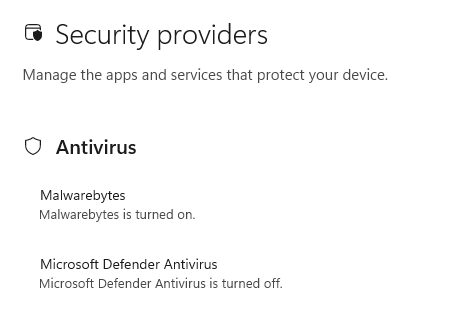
You're safe if Defender is turned off

So, narrowly speaking, disabling Defender appears to stop this specific ShieldBreak chain from working. However, that is not a good safety recommendation for most people. Turning off your antivirus removes an important layer of protection and could leave your computer exposed to other attacks.

For home users, all that means:

  • Install Microsoft’s security updates as soon as they become available.
  • Be very careful with downloads, email attachments, cracked software, and “fix” tools from random websites.
  • Keep backups of important files somewhere not directly connected to the PC.
  • Use an up-to-date, real-time anti-malware solution to alert you about and remove threats from your computer.

CNET Editors' Choice Award 2026

According to CNET. Read their review ?


Apple now uses iPhone alerts for targets of mercenary spyware

Apple has expanded its threat-notification system for targets of mercenary spyware.

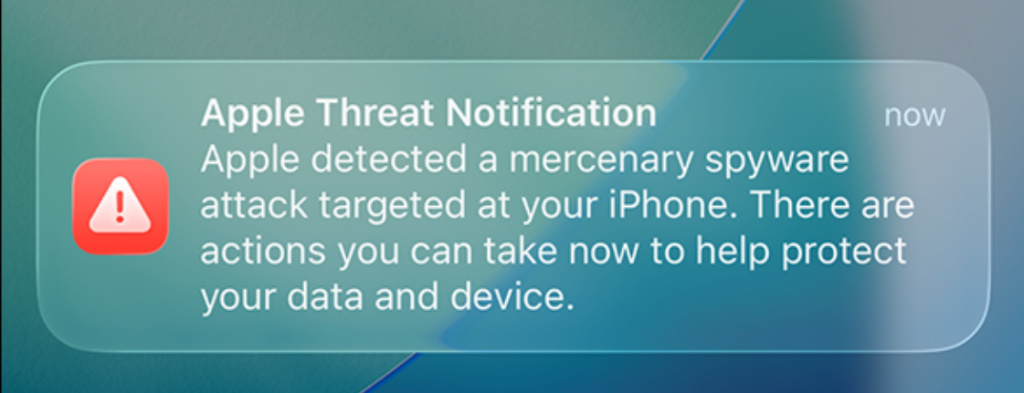
Apple now shows a warning directly on an iPhone’s Lock Screen and in Settings when it believes the device owner has been targeted by mercenary spyware. The new on-device alert is meant to make a high-risk warning harder to overlook and complements notifications by email and through the user’s Apple Account page.

In the explanation, Apple states:

“Apple threat notifications are high-confidence alerts that a user has been individually targeted by a mercenary spyware attack, and should be taken very seriously.”

Apple Threat Notification

“Apple Threat Notification
Apple detected a mercenary spyware attack targeted at your iPhone. There are actions you can take now to help protect your data and device.”

Apple says its threat notifications are intended for people individually targeted by mercenary spyware attacks, which are highly sophisticated campaigns usually associated with commercial surveillance vendors and their government customers. Apple says it has notified targets in over 150 countries since the launch of the program in 2021, while the latest round of notifications reached people in 110 countries.

Mercenary spyware campaigns are usually not aimed at the average iPhone owner—at least at first. The initial targets are often people selected for who they are, what they know, or the work they do. But it would be a mistake to view this as someone else’s problem.

Attack techniques developed for narrowly targeted operations have a habit of spreading. Exploits can be reused, sold onward, reverse engineered, copied by other surveillance vendors, or adapted by criminal groups. A vulnerability initially valuable because it compromises a small number of carefully chosen devices may become much more dangerous once public disclosure, patch analysis, or exploit sharing makes them available for more widespread campaigns.

How to stay safe

Apple advises users to:

  • Update your devices to the latest software, which includes the latest security fixes.
  • Protect your devices with a passcode, Touch ID, or Face ID.
  • Use two-factor authentication and a strong password for your Apple Account.
  • Turn on Stolen Device Protection.
  • Install apps from the App Store.
  • Use strong and unique passwords, and passkeys where available.
  • Don’t open links or attachments from unknown senders.

We’d like to add:

  • Potential targets of mercenary spyware should consider applying Apple’s Lockdown Mode.
  • Check if an Apple Threat Notification is real. Scammers will undoubtedly try and mimic them. You can verify a notification by signing in to your Apple account. A genuine Threat Notification will always be clearly listed there.
  • If you receive an Apple Threat Notification, Apple recommends seeking expert help, such as the Digital Security Helpline from Access Now.

Scammers know more about you than you think. 

Malwarebytes Mobile Security protects you from phishing, scam texts, malicious sites, and more. With real-time AI-powered Scam Guard built right in. 

Download for iOS ? Download for Android ? 

New Android malware lets criminals use your bank card in real time

Researchers at Group-IB have discovered a new NFC relay malware family, purpose-built to capture live card data via NFC and forward it in real time to attackers. They dubbed it “WindRelay.”

NFC (Near Field Communication) is wireless technology that allows devices such as smartphones, payment cards, and payment terminals to communicate when they’re very close together. So, instead of stealing your physical bank card, the attackers capture NFC activity on an infected mobile phone and relay it in real time to a criminal-controlled device held against a contactless payment terminal, or an ATM that supports contactless cash withdrawals.

The researchers describe a 13-minute call impersonating a bank, in which a victim was persuaded to install an Android app labelled with the bank’s name. That app was a remote access Trojan (RAT) called SpyNote. SpyNote gave the attacker remote control of the phone and enabled the quiet installation of a second app, WindRelay.

The attackers then opened the victim’s legitimate banking app remotely and arranged a loan in the victim’s name, while also asking them to tap their physical payment card against the phone and enter its PIN. That tap let the second app forward the card’s contactless data in real time to the criminals, allowing them to make purchases or, in some cases, withdraw cash from an ATM.

This division of tasks is the important development here. The remote-access malware (SpyNote) gets the attackers into the phone, and the NFC relay malware (WindRelay) turns the victim’s physical card into something the criminals can use elsewhere at that moment.

It’s not quite as simple as it sounds, because NFC comes in a few different “flavors.” Some produce a static code. Take the card that opens my apartment building door, for example. That kind of signal can easily be copied to a device like my Flipper Zero so I can use it to open the door. But sophisticated contactless payment cards use dynamic codes. Each time you tap to pay, your card’s chip generates a unique, one-time code (often called a cryptogram or token) that cannot be reused.

That’s why the critical feature of NFC relay malware is real-time relaying. Since payment card transactions use dynamic, transaction-specific cryptographic data, timing is central to this kind of fraud.

The telephone call isn’t just the lure. It’s also the attackers’ control channel. It lets them overcome the victim’s hesitation, respond to confusion instantly, and coordinate the precise moments when the victim installs an app, taps their card, and enters a PIN.

This is part of an established and expanding NFC relay fraud category sometimes called ghost tapping. In the past, we’ve discussed NGate and SuperCard X, which are similar malware families. But the combination with SpyNote is what makes this campaign stand out.

How to protect yourself

As with many security threats, the best defense is you. The cybercriminals behind this attack can’t do anything unless you install the software on your phone, so they go through several steps to convince you to do so.

  • Be skeptical of calls and text messages from people you don’t know, especially those claiming to be urgent. Scammers typically try to panic you into acting quickly. Once they get you on the phone, they can build trust, making it harder to think critically and say no.
  • If you feel compelled to take action, check in with someone you trust first. If you’re still convinced the request is genuine, verify the message independently. Call your financial institution using an official number, not through the one in the text message or email.
  • Never give personal details to anyone who contacts you unexpectedly, and never change your banking details at their request. A bank will not ask you to install an app from a link, text message, browser download, or other unofficial source to “secure” your card.
  • Avoid sideloading apps (installing them from outside of the Google Play store), and treat unexpected Accessibility or device-control permissions as a serious warning sign.
  • Use an up-to-date, real-time anti-malware solution to protect your devices.

Malwarebytes for Android detects SpyNote and WindRelay as:

  • Android/Trojan.NGate.ACRBCF9BBC3C1
  • Android/Trojan.NGate.ACR2401245FC5

Scammers know more about you than you think. 

Malwarebytes Mobile Security protects you from phishing, scam texts, malicious sites, and more. With real-time AI-powered Scam Guard built right in. 

Download for iOS ? Download for Android ?