A massive search-hijacking campaign involving 319 Chrome extensions with a combined 13.4 million reported installations redirected users’ searches through tracking servers to generate advertising revenue from Bing and Yahoo. […]
Of all the AI-powered video editing tools out there, Adobe Firefly might be the mightiest and the most convenient of the bunch. It’s packed with features that smoothly integrate into your workflow when you need them. If you’re starting from the beginning and want to generate material from a prompt, you can use Firefly. Not just for video, either. It lets you add stock images and even audio. Or if you have your media already and need to tweak it closer to perfection, there’s an extensive set of editing tools that offer studio-level quality and control over everything from lighting to sound effects.
This week, Axios reported that major US banks were detecting third-party AI agents operating inside customer accounts. In many cases, customers have given the agents their usernames and passwords so they could act on their behalf. This kind of access can violate a bank’s rules.
“Are you protecting me, or are you protecting your own profits?”
Bianco described traditional finance’s business model as “based on laziness.” Customers may leave idle cash in low- or no-interest bank accounts rather than move it into a money market fund. An AI agent could make that move for them. “Now that you’re able to do it, the banks are afraid they’re gonna lose that revenue stream,” he said.
The banks offer a different explanation. JPMorgan Chase CEO Jamie Dimon said the bank wouldn’t allow just any outside agent into its systems because doing so was “too risky for clients and for JPMorgan.”
Both explanations can be true: banks can want to retain deposits while also facing real security problems when software acts through customers’ accounts.
Handing over your banking login introduces another service into the security chain. A vulnerability in that service could expose your credentials or allow your account to be misused. And as Bank of America reportedly pointed out:
“If you do share your credentials, keep in mind that you’re responsible for activity resulting from that access.”
That’s the bank’s stated position, not a universal ruling on consumers’ legal rights. Still, it’s a warning worth taking seriously.
Pros and cons
An AI agent with permission to make purchases might find and buy an item at a lower price. But giving an agent access to your bank account also means sharing sensitive banking information with a third party. We’ve seen shared AI chats become searchable online too.
Axios reported that many banks allow, or are moving toward allowing, read-only access. This can let a tool analyze transactions without giving it permission to move money.
That’s an important boundary, but it doesn’t make the information harmless. An agent that can read bank statements may still disclose them if it’s compromised or manipulated. Preventing transactions and protecting confidentiality are separate security goals.
How to keep control of your money
For consumers, the practical question is not whether banks have perfectly selfless motives. It’s what access you’re giving away, and what could happen if the agent makes a mistake.
Don’t paste banking passwords or security codes into a general-purpose AI assistant. Major banks have explicitly warned customers against sharing their credentials.
Use your bank’s approved connection methods rather than giving an agent your login. Where supported, choose read-only access if all you need is analysis or budgeting help.
Give agents access to as little sensitive information as possible. An assistant comparing publicly advertised savings rates doesn’t need your bank statements. OpenAI recommends limiting agents to the data and credentials they need for the task.
Review consequential actions yourself. If an agent asks for confirmation, check exactly what it intends to do and what information it will share. Don’t treat a confirmation prompt as a formality.
AI can make it easier to compare financial products and spot opportunities you might otherwise miss. But an assistant that finds a better rate and an agent that can act inside your account are different propositions.
Let it help with the homework, but be cautious about handing it the keys.
Let’s face it, an incognito window can only do so much.
Breaches, dark web trading, credit fraud. Malwarebytes Identity Theft Protection monitors for all of it, alerts you fast, and comes with identity theft insurance.
Sony Network Communications has confirmed a data breach that compromised approximately 2.5 million records containing current and former customers’ personal information. […]
A rainy weekend stuck indoors is the perfect excuse to put your 3D printer to work on the house itself. While it hums along, you can line up new cabinet pulls without eyeballing them, replace that broken clip nobody sells anymore, and finally get the junk drawer under control. None of these projects need a garage full of tools, and by Sunday night something in your home will actually work better than it did on Friday.
Elections give scammers plenty to work with: urgent deadlines, familiar faces, passionate supporters, and messages asking people to take action.
Some want you to “fix” your voter registration. Others want a donation, an answer to a survey, or payment for merchandise supposedly endorsed by your favorite politician. The details change, but the objective stays the same: get your money, your personal information, or both.
Here are five election-themed scams to watch out for.
Scam 1. “We’ll help you vote”
Not every election-themed lure starts with a threat. Some offer to make voting easier.
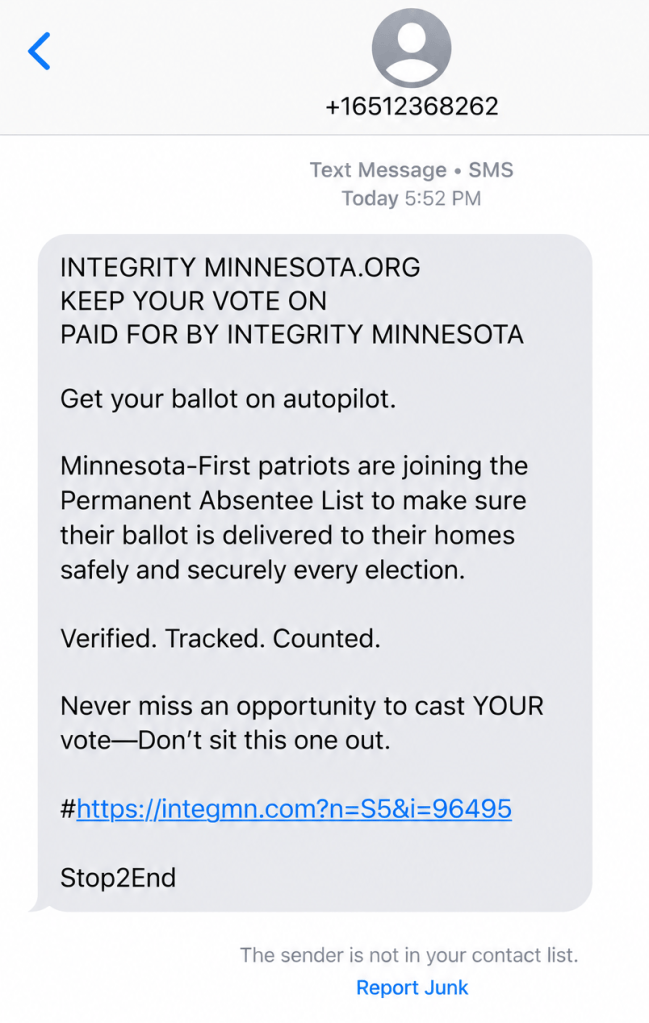
“Get your ballot on autopilot,” reads one text message we reviewed. It encourages recipients to join a permanent absentee list so their ballots arrive at home for every election, adding the reassuring words: “Verified. Tracked. Counted.”
A voting-assistance text message reviewed by Scam Guard
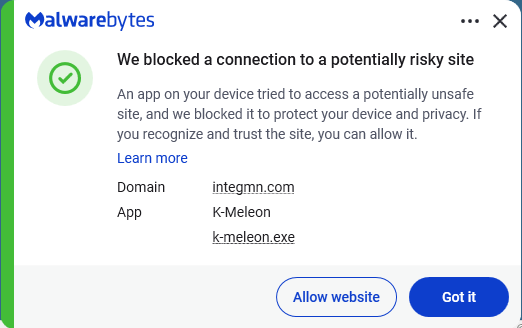
The message is a scam, though it borrows the language of a real Minnesota voting service. Minnesota does have a permanent absentee voter list, but the link in this text is fraudulent. To check or sign up, go directly to your election authority’s official website.
Other messages take the opposite approach: instead of offering convenience, they warn that you could lose your chance to vote.
A message might say you are not registered to vote, your details are incomplete, or your registration is about to be cancelled. Then it offers a link to sort everything out.
The FBI recently warned about messages that send recipients to fraudulent voter-registration pages. Instead of helping people vote, these sites collect personal information that criminals can use for further fraud.
In Brazil, scammers used a fake WhatsApp account with the Superior Electoral Court’s logo. It claimed to be the court’s “Customer Service Department” (which doesn’t exist) and told people to download an app called “Soluciona Pendência,” roughly translated as “Resolve an outstanding issue.” The message falsely warned that people could lose access to banking or government services.
Scam 2. “Donate now to help your candidate win”
A fundraising appeal arrives just as an election reaches a critical moment. It uses the candidate’s photograph, familiar campaign language, and an urgent request for money.
That does not necessarily mean the campaign sent it.
The FBI warns that scammers impersonate candidates and political fundraising organizations to collect supposed campaign contributions. Victims believe they are supporting a legitimate organization, but the money goes to criminals instead.
Before donating, find the campaign or organization’s official website yourself and check who will receive the payment. Don’t let a countdown, a matching-donation claim, or a message about an impending defeat rush your decision. The Better Business Bureau (BBB) advises researching political fundraising requests and resisting pressure to act immediately.
Scam 3. “Take our political survey and claim your reward”
Not every political poll is suspicious. But a request for your opinion can also be an opening for a scam.
The BBB warns about fraudulent polling calls that promise a prize in exchange for answering questions. After the “survey,” the caller asks for credit card information to cover shipping, taxes, or other costs associated with the supposed reward.
At that point, the questions about candidates have served their purpose: keeping you engaged long enough to introduce a payment request.
Other election-themed messages ask people to complete surveys through links. Treat those links with the same caution you would an unexpected donation or registration request. A familiar political organization’s name does not establish who operates the website.
You can decline an unsolicited poll. You should not need to hand over payment details simply to share your political views or claim a surprise reward.
Scam 4. “Pay this electoral fine” or “Report for election duty”
Few things make a message feel urgent quite like an official-looking demand backed by a possible penalty.
Brazil’s Superior Electoral Court (TSE) has warned about messages falsely claiming people had an unresolved voting issue. The messages link to fake government websites designed to steal personal information or trick people into paying.
Brazil does have legitimate electoral fines, which can be paid through official channels, including Pix. So a fine or Pix request alone doesn’t prove a message is a scam. If a message says you owe money or must perform election duty, check with the relevant authority using contact details from its official website. Don’t use the message’s phone number, link, or QR code.
Scam 5. Your favorite politician “wants you to buy this”
A politician’s name can be used to sell more than a political message.
Criminals use candidates’ names, photographs, logos, and slogans to advertise merchandise that never arrives. What looks like a way to support a candidate becomes an ordinary shopping scam wrapped in campaign branding.
Apply the same skepticism to a “commemorative,” “patriotic,” or supposedly collectible product advertised using a politician’s name. Before buying, ask:
Is the seller actually affiliated with the politician or campaign?
What, exactly, are you buying?
Is there evidence for claims about the product’s quality, usefulness, or future value?
What are the total price, refund terms, and any recurring charges?
A product does not become useful, valuable, or a sound investment because an ad places it beside a politician’s photograph. Nor does a photograph prove that the politician endorsed it.
There is also a difference between a product you consider poor value and a fraudulent offer. A product being poor value doesn’t automatically make it a scam. Look for clear deception: a fake endorsement, false claims, hidden fees, or an order that never arrives.
How to stay safe from election scams
You don’t need to work out every detail of a suspicious message before deciding whether to act on it. Verify the message through a route the sender does not control.
Go directly to official election websites to check registration, voting requirements, deadlines, and alleged penalties.
Verify donation requests independently. Find the campaign or organization yourself and confirm where your money will go.
Keep payment details out of unsolicited surveys. A political poll that turns into a request to pay for a prize is a red flag.
Check sellers before buying political merchandise. A candidate’s name or logo does not authenticate the shop.
Don’t mistake personal details for proof. A message can contain accurate information about you and still be a scam.
Keep political choices separate from requests for money or personal information. You can support a cause without responding to an unexpected message.
You may have forgotten about Popcorn Time. Unfortunately, its updater didn’t forget about your device.
Security researchers have intervened to disable an abandoned update mechanism in Time4Popcorn, a version of the once-popular streaming app. If left running in the background, the updater could have allowed attackers to take control of Windows and Mac computers, even if their owners hadn’t opened the app in years.
Eye Security estimates that the vulnerable updater was present on millions of devices worldwide, including 2.5–3 million Windows computers and around 250,000–350,000 Macs.
Popcorn Time made watching movies and TV shows through BitTorrent look more like browsing Netflix. Rather than making users find torrent files and open them in a separate client, it wrapped the process in a familiar streaming-style interface.
Amid concerns about copyright infringement and its possible consequences, the original developers abandoned it shortly after its launch in 2014. But because its source code was publicly available, other developers could pick it up and create their own versions, known as forks.
One of those was Time4Popcorn, which was also distributed under the name “Popcorn Time.” That shared branding matters because people may have installed the affected software without ever seeing the Time4Popcorn name.
The problem at hand
Time4Popcorn was eventually abandoned too. But its update infrastructure was left behind, and at some point the domains associated with the software became available for others to register.
In other words, the people maintaining the software had gone away. The software’s ability to accept instructions had not. Time4Popcorn’s updater used unencrypted HTTP connections and accepted executable updates without checking digital signatures to verify their authenticity. So, someone who controlled an update domain or was able to tamper with the unencrypted traffic could supply their own program instead.
That combination created a remote code execution vulnerability, tracked as CVE-2026-30612, which could let an attacker run malicious software on a device. An attacker wouldn’t need to persuade someone to watch a movie or click a suspicious attachment. The forgotten updater could do the work for them.
Although Android was affected too, users had an extra layer of protection. Its updater checked for updates when the application was opened, but installing an attacker-supplied APK required the user to approve the installation. It was not the same silent, background takeover route researchers found on Windows and macOS.
What the researchers did
Eye Security registered an abandoned update domain and used the vulnerable mechanism to distribute an update that disabled the updater itself. On Windows, it stopped and disabled the service; on macOS, it prevented the update process from starting. The researchers say their intervention did not delete users’ files or collect host data.
By March 2026, Eye Security reported more than two million downloads of its updater-disabling fix, and update requests to its domains had fallen by 98%. Later that month, it transferred the 15 domains it controlled to the nonprofit Shadowserver Foundation.
Researchers could not remotely disable the Android updater in the same way. And the desktop application still contained other weaknesses, including an obsolete Chrome engine dating from 2014 and disabled sandbox protections, which normally help contain malicious code.
What users should do
If you used Popcorn Time years ago, check the devices on which you installed it. Don’t assume that no longer using an application means its background components have stopped running.
Check your list of installed applications for Popcorn Time or Time4Popcorn. Pay particular attention to older Windows PCs, Macs, and Android devices where you may have forgotten about installing it. The affected fork was distributed under both names.
Remove the old application. There is no vendor security update for the abandoned Time4Popcorn software. Disabling the updater addresses one vulnerability, not the application’s other security weaknesses.
On Windows and macOS, check that the background updater is no longer running. Eye Security identifies the Windows component as Updater.exe, normally inside a Popcorn Time folder under Program Files or Program Files (x86), running through a service called Update Service. On macOS, the component is /Library/PrivilegedHelperTools/PT.updd, with a launch daemon at /Library/LaunchDaemons/PT.updd.plist. Its advisory provides instructions for disabling these components if needed.
On Android, uninstall the affected app rather than accepting an update prompt from it.The updater is part of the main application and cannot easily be disabled separately.
Use an up-to-date, real-time anti-malware solution to detect and block any attempts to install malware on your devices.
As we saw recently, cybercriminals can use software updates to distribute malware. Remove abandoned apps and check for any background updaters they leave behind.
From reporting threats to removing them.
Cybersecurity risks should never spread beyond a headline. Keep threats off your devices by downloading Malwarebytes today.
I follow the straightforward Task Manager route to disable anything I don’t plan to use as soon as I log on. It saves some boot time and stops distractions.
A new UEFI bootkit named BlackX, deployed in an espionage campaign in early 2026, exploited the old Baton Drop vulnerability to bypass Secure Boot and load a malicious driver designed to interfere with security solutions from Kaspersky and Avast. […]