Archives October 2026

Facebook’s misleading privacy claims land Meta a $25 billion penalty

Facebook’s Cambridge Analytica scandal may feel like very old news. But the consequences are still arriving, and the latest comes with a $25 billion price tag.

Reuters reports that a New Mexico judge has ordered Meta to pay $25 billion in civil penalties after a jury found that Facebook misled consumers about its data practices and its handling of hate speech and misinformation. Meta says it expects to win on appeal.

This case is about more than information ending up in the wrong hands. It concerns what Facebook told people about who could access their information, how much control users had, and how the company enforced its own rules.

What Facebook told its users

In September, jurors found that the company and its leadership made 26 misleading statements on data privacy, hate speech, and other subjects. For example, Mark Zuckerberg’s 2010 statement that:

“We do not share your personal information with people or services you don’t want.”

That assurance appeared in a statement the jury found misleading. The judge found that choosing who could see a Facebook post did not necessarily control what outside app developers could access. That access was governed by separate settings that many users did not know existed.

New Mexico’s attorney general filed the lawsuit in 2021, following revelations that Cambridge Analytica obtained personal information from as many as 87 million Facebook users through a third-party app.

But New Mexico’s case went beyond Cambridge Analytica.

The state challenged Facebook’s representations to consumers about its data practices and its efforts to address misinformation and hate speech. The case centered on misleading consumers under New Mexico’s Unfair Practices Act, the state’s consumer protection law.

The state argued that third parties had broad access to users’ information and that Facebook tolerated harmful content when doing so benefited its business. Meta disputed the allegations, denied selling users’ information, and said the state had taken statements out of context.

New Mexico’s Department of Justice says the jury found 43,899,725 violations of state law. That does not mean nearly 44 million individual New Mexicans had their data taken. The count reflected the estimated audience for each misleading statement, rather than the number of individual people affected.

State law allows penalties of up to $5,000 per violation. Judge Francis Mathew found that a penalty exceeding $219 billion was warranted under the law but reduced the amount to $25 billion.

The judge said earlier penalties had failed to stop Meta from misleading consumers, including a $5 billion FTC penalty in 2019.

The money is not earmarked for compensation payments to individual Facebook users. According to Attorney General Raúl Torrez, state law directs the penalties to New Mexico’s school system.

Meta’s chief legal officer, C.J. Mahoney, said the company is confident it will prevail on appeal and characterized the lawsuit as an attempt to impose “a tax on speech.” Meta has also argued that a multibillion-dollar penalty risks violating constitutional protections concerning due process and excessive fines.

How to stay safe on social media

The case illustrates why privacy is not just a matter of choosing who can see a post. In a separate 2019 case, the Federal Trade Commission (FTC) alleged that Facebook had shared users’ information with third-party apps used by their friends, even when those users had chosen restrictive privacy settings.

A few precautions can help you limit what you share, although settings alone cannot guarantee privacy:

  • Share selectively. Leave optional profile details blank, limit who can see your posts, and avoid publishing sensitive details such as your address or live location. Ask permission before posting information or photos involving other people.
  • Check app permissions. Does a social media app really need your contacts, precise location, or entire photo library? Turn off unnecessary access in your device settings.
  • Review tracking and advertising settings. Look for controls covering personalized ads, activity outside the platform, and data sharing. Restrict what you can, but don’t assume opting out of personalized ads stops all collection.
  • Be selective about connected apps. Before connecting a quiz, game, or other service to your account, check what information it requests. Decline access that seems excessive for what the service does.
  • Remember what “private” means. Restricting your audience helps control who sees your posts. It does not stop the platform itself from collecting or using information about your activity.

Scammers don’t need to hack you. They just need you to click once. 

Malwarebytes Identity Theft Protection catches suspicious activity before it becomes a problem.

PHP2Shell: Why websites are going offline for emergency security updates

If you’ve encountered websites in maintenance mode today, it may be a security precaution. Reports of attacks targeting two critical PHP vulnerabilities have prompted warnings to install emergency updates and consider temporarily taking affected services offline until they can be patched.

The vulnerabilities, known as PHP2Shell, are tracked as CVE-2026-109618 and CVE-2026-109619. Both carry a severity rating of 9.2 out of 10.

Why this matters

PHP is a programming language that works behind the scenes to power a large part of the web. It underpins WordPress, Drupal, Joomla, Magento, and many other applications, including software whose users may not realize PHP is involved.

Successful exploitation could let an attacker run malicious code on an affected server without logging in. That code would run with the permissions available to the PHP process, potentially allowing attackers to steal application data, alter website content, or establish a backdoor.

The PHP team says all PHP installations serving web requests are at risk. In some configurations, an attacker can trigger an exploit before the website’s own code even runs.

Cloudflare’s chief technology officer, Dane Knecht, has reported “early attacks emerging,” while warning that firewall mitigations are only a stopgap.

Emergency patches are now available

The PHP team scheduled its emergency security updates for October 21 at 10:00 am ET (14:00 UTC). It has now released fixes in PHP 8.5.12, 8.4.27, 8.3.36, and 8.2.35, and urges users to update immediately. Administrators should check with their hosting provider or operating system vendor for the appropriate updated packages.

You may still encounter offline websites while administrators install the updates and check their systems.

CERT-EU recommends identifying PHP-based applications and patching as soon as possible. Where an immediate fix is not feasible, it advises considering isolation of internet-facing applications from public networks.

The risk may outlast today’s emergency

The longer-term concern is forgotten infrastructure: abandoned websites, unsupported applications, and connected devices with PHP-based management interfaces. Vulnerable installations may remain exposed if nobody maintains them or a vendor no longer supplies updates.

PHP 8.1 and older no longer receive routine security updates from the PHP project. Administrators using those versions should check whether their vendor supplies a fix or arrange an upgrade to a supported version.

Website owners should establish who updates their underlying PHP installation. Updating WordPress or its plugins is not the same as updating PHP. Hosting providers or server administrators may need to apply the fix.

For visitors, temporary downtime alone doesn’t mean a website has been breached. It may reflect a protective decision while its administrators install updates.

However, consumers need to be extra careful as a “trusted website” may no longer be trustworthy, and not just because of PHP2Shell, but also because of eight compromised TLS certificates.

Shahak Shalev, Global Head of Scam and AI Research at Malwarebytes, said:

“This is a goldmine for hackers. They can hijack real websites to take advantage of the site’s reputation to do things like phish people, serve malicious software from the trusted channel. The opportunities are endless.”

What to do

If you’re a website visitor:

  • Some websites may temporarily go offline while they are patched.
  • Watch for unexpected content, downloads, or redirects, and repeated login requests, even on familiar sites.
  • If something looks wrong, leave the page.
  • You don’t need to install PHP updates on your own device.

If you’re a website owner:

  • Ask your hosting or IT provider to confirm PHP fixes are installed, not just scheduled, across all your websites and applications.
  • If they can’t patch immediately, ask whether affected services should temporarily be taken offline.
  • If you manage your own servers, follow PHP’s update instructions.
  • Using unsupported PHP? Check for a vendor fix or upgrade to a supported version.

What Malwarebytes is doing

  • Helping keep you safe from hacked websites: Malwarebytes web protection and Browser Guard block known harmful sites, scam pages, and dangerous downloads. Our researchers are watching for websites compromised through these flaws so we can quickly add them to our block lists.
  • Updating our own websites: We use a managed hosting provider and are working with them to install the PHP fixes. We are closely monitoring our websites until the updates are in place.

Stop threats before they can do any harm.

Malwarebytes Browser Guard blocks phishing pages and malicious sites automatically. Free, one click to install. Add it to your browser ?

AOMEI Backupper update servers hijacked to push malware: Check your PC

The Google Threat Intelligence Group (GTIG) reports that attackers compromised AOMEI Technology’s update and notification infrastructure in a campaign investigated between April and July.

AOMEI Backupper is backup software that the company says is used by more than 100 million people worldwide. It lets users back up files, copy entire drives, and recover data if something goes wrong with their PC.

The attackers briefly altered AOMEI’s update and notification infrastructure to make customers’ software download and run malware.

The same system also serves AnyViewer customers, but the report does not separately identify confirmed AnyViewer infections.

For brief periods, the attackers changed the software’s download instructions to point to a malicious ZIP archive. They also changed the expected version number and MD5 checksum so the client would accept it. Because the same remote configuration file provided the download address and expected checksum, the attackers could change both the download and the information the software used to accept it.

The researchers confirmed three tampering windows lasting ten, six, and five minutes, but more may have occurred. While these short windows provided fewer opportunities to infect machines, they also made the attack harder to spot.

The attack used an initial downloader to install a persistent remote-access backdoor. The researchers did not identify the delivered malware as ransomware or an infostealer, but the backdoor lets attackers run commands and install additional malware. That means an infected PC could remain open to further attacks.

How to check if you were affected

If you used AOMEI Backupper during the affected period, update your security software and run a scan. You can download Malwarebytes Free to check for and remove malware.

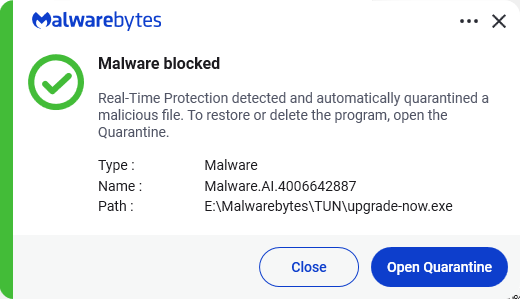
Malwarebytes’ AI detection engine identifies the initial malware downloader, upgrade-now.exe, as Malware.AI.4006642887 so ThreatDown and Malwarebytes customers were protected by the real-time detection component.

Malwarebytes detects the malware dropper upgrade-now.exe

If you’re comfortable checking Windows settings and files, these are additional warning signs:

  • Open Windows Task Scheduler and check the Task Scheduler Library for a task named RadminComponentRuntime.
  • Look in your AOMEI Backupper installation folder, particularly its version-specific html and Tmphtml folders, for an unsigned upgrade-now.exe or an unexpected upgrade-now.zip. Note that the malware downloader deletes itself after staging the next payload and creating persistence, so its absence does not mean the PC is clean.
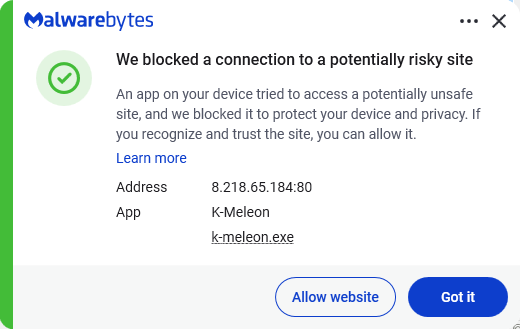
  • If you’re seeing outgoing traffic to promotion.storage-data.com, aomei.storage-data.com, storage-data.com, 8.210.84.56, 47.239.60.117, or 8.218.65.184, whether blocked or allowed.
Malwarebytes blocks 8.218.65.184

If you encounter one of these signs, get help rather than trying to clean everything manually. Disconnect the PC from the internet if you suspect it is actively compromised, and contact a trusted computer technician, Malwarebytes Support, or your organization’s IT/security team.


From reporting threats to removing them.

Cybersecurity risks should never spread beyond a headline. Keep threats off your devices by downloading Malwarebytes today.