Archives 2026

Apple now uses iPhone alerts for targets of mercenary spyware

Apple has expanded its threat-notification system for targets of mercenary spyware.

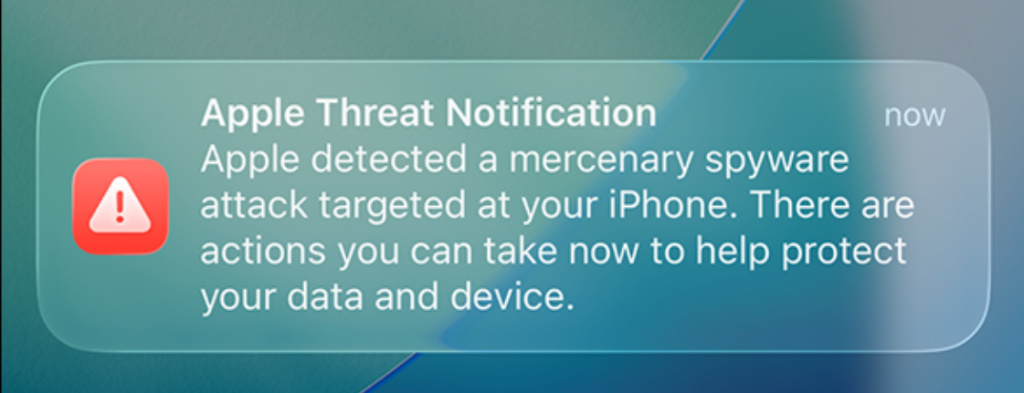
Apple now shows a warning directly on an iPhone’s Lock Screen and in Settings when it believes the device owner has been targeted by mercenary spyware. The new on-device alert is meant to make a high-risk warning harder to overlook and complements notifications by email and through the user’s Apple Account page.

In the explanation, Apple states:

“Apple threat notifications are high-confidence alerts that a user has been individually targeted by a mercenary spyware attack, and should be taken very seriously.”

Apple Threat Notification

“Apple Threat Notification
Apple detected a mercenary spyware attack targeted at your iPhone. There are actions you can take now to help protect your data and device.”

Apple says its threat notifications are intended for people individually targeted by mercenary spyware attacks, which are highly sophisticated campaigns usually associated with commercial surveillance vendors and their government customers. Apple says it has notified targets in over 150 countries since the launch of the program in 2021, while the latest round of notifications reached people in 110 countries.

Mercenary spyware campaigns are usually not aimed at the average iPhone owner—at least at first. The initial targets are often people selected for who they are, what they know, or the work they do. But it would be a mistake to view this as someone else’s problem.

Attack techniques developed for narrowly targeted operations have a habit of spreading. Exploits can be reused, sold onward, reverse engineered, copied by other surveillance vendors, or adapted by criminal groups. A vulnerability initially valuable because it compromises a small number of carefully chosen devices may become much more dangerous once public disclosure, patch analysis, or exploit sharing makes them available for more widespread campaigns.

How to stay safe

Apple advises users to:

  • Update your devices to the latest software, which includes the latest security fixes.
  • Protect your devices with a passcode, Touch ID, or Face ID.
  • Use two-factor authentication and a strong password for your Apple Account.
  • Turn on Stolen Device Protection.
  • Install apps from the App Store.
  • Use strong and unique passwords, and passkeys where available.
  • Don’t open links or attachments from unknown senders.

We’d like to add:

  • Potential targets of mercenary spyware should consider applying Apple’s Lockdown Mode.
  • Check if an Apple Threat Notification is real. Scammers will undoubtedly try and mimic them. You can verify a notification by signing in to your Apple account. A genuine Threat Notification will always be clearly listed there.
  • If you receive an Apple Threat Notification, Apple recommends seeking expert help, such as the Digital Security Helpline from Access Now.

Scammers know more about you than you think. 

Malwarebytes Mobile Security protects you from phishing, scam texts, malicious sites, and more. With real-time AI-powered Scam Guard built right in. 

Download for iOS ? Download for Android ? 

New Android malware lets criminals use your bank card in real time

Researchers at Group-IB have discovered a new NFC relay malware family, purpose-built to capture live card data via NFC and forward it in real time to attackers. They dubbed it “WindRelay.”

NFC (Near Field Communication) is wireless technology that allows devices such as smartphones, payment cards, and payment terminals to communicate when they’re very close together. So, instead of stealing your physical bank card, the attackers capture NFC activity on an infected mobile phone and relay it in real time to a criminal-controlled device held against a contactless payment terminal, or an ATM that supports contactless cash withdrawals.

The researchers describe a 13-minute call impersonating a bank, in which a victim was persuaded to install an Android app labelled with the bank’s name. That app was a remote access Trojan (RAT) called SpyNote. SpyNote gave the attacker remote control of the phone and enabled the quiet installation of a second app, WindRelay.

The attackers then opened the victim’s legitimate banking app remotely and arranged a loan in the victim’s name, while also asking them to tap their physical payment card against the phone and enter its PIN. That tap let the second app forward the card’s contactless data in real time to the criminals, allowing them to make purchases or, in some cases, withdraw cash from an ATM.

This division of tasks is the important development here. The remote-access malware (SpyNote) gets the attackers into the phone, and the NFC relay malware (WindRelay) turns the victim’s physical card into something the criminals can use elsewhere at that moment.

It’s not quite as simple as it sounds, because NFC comes in a few different “flavors.” Some produce a static code. Take the card that opens my apartment building door, for example. That kind of signal can easily be copied to a device like my Flipper Zero so I can use it to open the door. But sophisticated contactless payment cards use dynamic codes. Each time you tap to pay, your card’s chip generates a unique, one-time code (often called a cryptogram or token) that cannot be reused.

That’s why the critical feature of NFC relay malware is real-time relaying. Since payment card transactions use dynamic, transaction-specific cryptographic data, timing is central to this kind of fraud.

The telephone call isn’t just the lure. It’s also the attackers’ control channel. It lets them overcome the victim’s hesitation, respond to confusion instantly, and coordinate the precise moments when the victim installs an app, taps their card, and enters a PIN.

This is part of an established and expanding NFC relay fraud category sometimes called ghost tapping. In the past, we’ve discussed NGate and SuperCard X, which are similar malware families. But the combination with SpyNote is what makes this campaign stand out.

How to protect yourself

As with many security threats, the best defense is you. The cybercriminals behind this attack can’t do anything unless you install the software on your phone, so they go through several steps to convince you to do so.

  • Be skeptical of calls and text messages from people you don’t know, especially those claiming to be urgent. Scammers typically try to panic you into acting quickly. Once they get you on the phone, they can build trust, making it harder to think critically and say no.
  • If you feel compelled to take action, check in with someone you trust first. If you’re still convinced the request is genuine, verify the message independently. Call your financial institution using an official number, not through the one in the text message or email.
  • Never give personal details to anyone who contacts you unexpectedly, and never change your banking details at their request. A bank will not ask you to install an app from a link, text message, browser download, or other unofficial source to “secure” your card.
  • Avoid sideloading apps (installing them from outside of the Google Play store), and treat unexpected Accessibility or device-control permissions as a serious warning sign.
  • Use an up-to-date, real-time anti-malware solution to protect your devices.

Malwarebytes for Android detects SpyNote and WindRelay as:

  • Android/Trojan.NGate.ACRBCF9BBC3C1
  • Android/Trojan.NGate.ACR2401245FC5

Scammers know more about you than you think. 

Malwarebytes Mobile Security protects you from phishing, scam texts, malicious sites, and more. With real-time AI-powered Scam Guard built right in. 

Download for iOS ? Download for Android ? 

“Zoomsday” flaws could let one Zoom participant attack another

Researchers have found three vulnerabilities in the popular Zoom meeting platform that could let one meeting participant attack another through malicious collaboration data.

The vulnerabilities, tracked as CVE-2026-53413, CVE-2026-53414, and CVE-2026-53415, affect the code Zoom uses to process annotation data shared during meetings. The researchers named the set of flaws “Zoomsday.”

Affected applications are:

  • Zoom Workplace on all supported platforms before version 7.1.5 and 7.0.6, depending on the release branch
  • Zoom Workplace VDI Client for Windows before versions 7.0.11 and 6.6.16, depending on the release branch
  • Zoom Rooms on all supported platforms before version 7.1.5
  • Zoom Meeting SDK on all supported platforms before version 7.1.5

What can happen

What this means is that someone in the same Zoom meeting could send data that the Zoom app was not prepared to handle. Instead of simply displaying a drawing, text box, or other annotation, a vulnerable client could be tricked into crashing, leaking information, or even running attacker-controlled code.

Annotation features sound simple, but the underlying process is not. Your Zoom client receives structured data from another participant and turns that data into an object it can display on screen. According to the research, the annotation parser contained several memory-safety bugs. Like any software that processes data supplied by a third party, it has to be very careful about validating lengths, counts, and references before using them.

Remarkably, there is a discrepancy between the severity ratings assigned by the researchers, who rated them as Critical, and Zoom, which rated them as High.

The difference appears to come down to how the vulnerabilities are scored under the Common Vulnerability Scoring System (CVSS score). Zoom considers successful exploitation to require user interaction.

In practice, an attacker would first need to get into the same meeting as the intended victim. That could mean joining an open meeting, abusing a leaked meeting link, posing as an expected attendee, or compromising an account that already has access. Zoom considers it user interaction if the attacker persuades the target to join a meeting with the intent to compromise their machine.

How to stay safe

Zoom has published a security bulletin explaining which programs need to be updated and where to find the fixed versions.

To protect yourself from Zoomsday and have safe meetings:

  • Update Zoom to the latest version as soon as possible.
  • Restrict who can join your Zoom meetings. Use passcodes, waiting rooms, authenticated-user restrictions, and unique meeting links for sensitive calls.
  • If features like annotation, whiteboards, remote control, file transfer, or third-party apps are not needed, consider turning them off, especially for meetings that have an open invitation nature.
  • One crashed meeting is not proof of an attack, but if it happens on a regular basis, it’s worth investigating.
  • Use an up-to-date, real-time anti-malware solution to block malicious code on your devices.
  • Organizations should also check their device-management tools to make sure every deployed Zoom client is receiving updates.

From reporting threats to removing them.

Cybersecurity risks should never spread beyond a headline. Keep threats off your devices by downloading Malwarebytes today.