Microsoft Outlook to block MSIX attachments starting November
Microsoft announced that it will add .msix and .msixbundle attachments to the list of blocked attachments in Outlook Web and the new Outlook Windows client starting next month. […]

Microsoft announced that it will add .msix and .msixbundle attachments to the list of blocked attachments in Outlook Web and the new Outlook Windows client starting next month. […]

Smart locks can be wonderful — until you’re locked out of your home when the battery dies. Amazon’s Ring believes it has a solution with a new Ring Smart Lock that you can recharge with a crank.

If you’re a middle-aged geek like me, you’ll love a good hobby. Whether you’re obsessed with pulling the perfect god shot of espresso or building the perfect audiophile setup, a lot of hobbies can get very expensive. They don’t have to start that way; plenty of great tech hobbies let you start with gadgets you may already have lying around.

Hackers are exploiting stored cross-site scripting (XSS) vulnerabilities in two unrelated WordPress plugins, Ninja Forms and WPC Product Bundles for WooCommerce, to install backdoors and create rogue admin accounts. […]

Thousands of global fashion retailer ASOS customers have received a push notification through the ASOS app this morning alleging that the company has been hacked.
The notification, addressed to ASOS’s data protection officer and IT, says:
“ASOS HACKED
Dear Asos DPO and IT, we have fully compromised ?the Snowflake instance. Engage with us, or we will leak it”

Snowflake is a cloud-based data platform that organizations use to store, process, and analyze data. We know that ASOS’s marketing team uses Simon AI from a blog posted by Simon. Simon AI specializes in personalization and runs on Snowflake. ASOS has described using Simon AI alongside Braze to personalize and trigger customer communications like push notifications to clients’ phones.
The apparent delivery of the message through ASOS’s own app makes this more concerning than an unsupported social-media claim. It suggests unauthorized use of the notification infrastructure, but does not confirm that the claimed Snowflake compromise occurred or that customer data was stolen.
According to Simon AI, typical customer profiles cover:
If the affected systems contain these profiles, a breach could expose a detailed picture of customers’ shopping habits and preferences. However, the published description of ASOS’s marketing setup does not establish what, if anything, the attackers accessed.
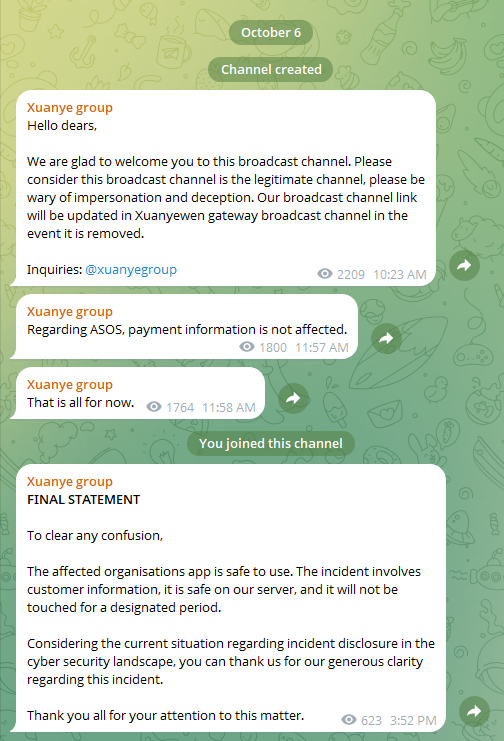
The Guardian reports that the group claiming the breach calls itself the “Xuanye group.” The Telegram channel operated by the group carried the message “Regarding Asos, payment information is not affected,” and the “app is safe to use” but those claims have not been independently verified.
Sky News reports that ASOS confirmed an “unauthorised customer notification” was sent at around 10 am today.
“We are investigating unauthorised activity involving third-party platforms that we use to communicate with customers,” it said in a statement.
The retailer said it immediately restricted access to the notification platforms and is working with specialists and relevant authorities.
It added:
“Basic personal information including name and contact details may have been accessed. We do not believe that payment-card information or account passwords, were impacted.”
The website and app remain operational, and there is currently no verified evidence that customer databases, payment card information, passwords, etc. have been stolen.
So, it’s too early to say if and how much ASOS customer data the attackers could get their hands on, but the potential scope is significant. Customer data could be used in targeted phishing attacks to add credibility.
What do cybercriminals know about you?
Use Malwarebytes’ free Digital Footprint scan to see whether your personal information has been exposed online.

UK fashion retailer ASOS confirmed a data breach Tuesday after hackers sent unauthorized push notifications through its mobile app while claiming to have stolen customer data from the company’s Snowflake environment. […]

You won’t have to sit in the living room to watch TV shows receiving their annual honors. Amazon and the Television Academy have signed a six-year agreement to make Prime Video the exclusive, free streaming home for the Emmy Awards.

Retailers are beginning to prep for the holiday shopping season, with stores like Best Buy leading the way, slashing prices and adding on massive markdowns on tons of products and gear—good news if you’re looking to get your shopping done early. A fantastic strategy is to look at products that are just slightly out of season, like this massive 77-inch OLED TV from LG.

OpenAI is preparing to add invisible watermarks to text generated by ChatGPT and Codex in the European Union. […]

Companies like Google and Microsoft are finding much bigger numbers of vulnerabilities in their own products as a result of AI. But the same technology is leading to public reporting programs becoming overwhelmed by the mass submission of speculative, duplicated, or hallucinated findings.
Now, Google’s announced it has temporarily stopped accepting submissions to its open source bug bounty program, OSS VRP.
“Why is this happening? This pause is due to a significant rise in automated submissions, the vast majority of which are not valid.”
We’ve seen this happen before. In early 2026, curl ended its HackerOne bounty program after low-quality, often AI-generated submissions overwhelmed its small security team.
Intel also launched a new bug bounty program on Intigriti but there are no longer bounties available, reportedly in order to stop a flood of AI generated reports.
Bounties can be an incentive for mass-submitting behavior when generative AI lowers the cost of producing polished-looking submissions. So, it’s understandable that companies want to limit the number of incoming reports.
If most automated submissions are invalid, a temporary pause prevents Google engineers and open-source maintainers from spending disproportionate time disproving reports rather than fixing real issues.
A pause gives Google the time and chance to introduce better controls, such as mandatory proof-of-concept requirements, evidence thresholds, and rate limits without letting the current queue keep growing.
On the other hand, it may discourage legitimate researchers and make it harder for them to submit actual issues they’ve found.
It is hard to draw a line of what you will accept, because an AI-assisted report can be valid, just like a low-quality report is not necessarily AI-generated.
And as companies like Google and Microsoft have proven, AI assisted vulnerability discovery can also support real vulnerability discovery if it is coupled with validation, deduplication, and proof.
If we have learned anything it is that AI is not “breaking” vulnerability disclosure. It is exposing an older weakness in disclosure economics: the cost of filing a plausible report has fallen sharply, while the cost of proving or disproving it remains human-intensive.
The solution seems obvious. Let AI handle the submissions and only hand over those it can validate to the engineering teams. This will definitely frustrate some bug bounty hunters, because it will be like convincing a chatbot that you have a valid point and want to “talk to a human,” but hopefully it will bring down the number of less serious bug bounty hunters and create more room for those who know what they are doing.
Google has only promised an update in Q1 2027, so any redesign details would be speculative, but we do hope they find a way for responsible bug hunters to submit their findings.
From reporting threats to removing them.
Cybersecurity risks should never spread beyond a headline. Keep threats off your devices by downloading Malwarebytes today.